
Integrate RHEL 9 with Active Directory Using SSSD
This guide integrates one RHEL 9 host with an existing Active Directory domain using realmd and SSSD. It covers Linux host logins, not a Samba file server. You need root access, working RHEL repositories, an AD account delegated to join the pilot computer to its approved OU, and two test users: one allowed and one denied. Example domain and group names must be replaced throughout.
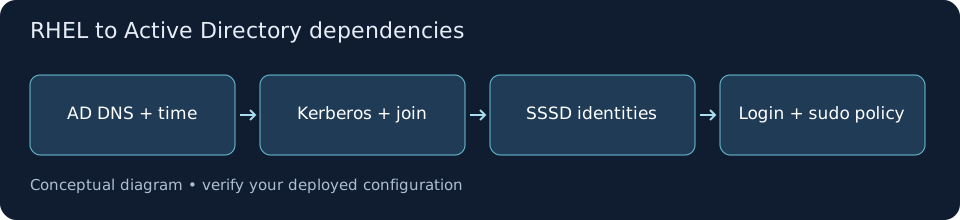
Record the Pilot and Its Identity Policy
PreflightConfirm the hostname and domain design with the AD owner. Decide whether this estate uses SSSD SID-based ID mapping or AD POSIX attributes before joining: changing this later can alter numeric ownership. This walkthrough uses default ID mapping and fully qualified names. Record any existing domain membership instead of replacing it.
hostnamectlhostname -frealm listauthselect currentsudo test ! -e /etc/sssd/sssd.conf || sudo stat /etc/sssd/sssd.conf❯ What to Verify
A unique approved FQDN, the current authentication profile, and any existing realm are recorded.Verify AD DNS and Time Before Joining
DependenciesConfigure the host to use your organization’s AD-capable DNS resolvers through its existing network management process. DNS must resolve domain-controller service records. Compare chrony synchronization with the AD time source; do not disable clock or Kerberos checks to work around a failure. Allow the documented AD traffic through the approved network path.
cat /etc/resolv.confchronyc trackingchronyc sources -v# Install DNS query tools if they are not present.sudo dnf install bind-utilsdig +short SRV _ldap._tcp.dc._msdcs.ad.example.comdig +short SRV _kerberos._tcp.ad.example.com❯ What to Verify
SRV queries return reachable DC names and ports; the host is synchronized to an approved time source.Discover the Domain and Join the Approved OU
Domain JoinInstall the supported client components, then inspect discovery before joining. The join command prompts for the delegated account’s password; do not put a password in a shell command. Confirm the OU distinguished name with the AD owner. Have the owner verify the resulting computer object after the join.
sudo dnf install realmd sssd sssd-tools adcli oddjob oddjob-mkhomedir samba-common-tools krb5-workstationrealm discover --server-software=active-directory ad.example.comsudo realm join --user=linux-join \ --computer-ou='OU=Linux,OU=Servers,DC=ad,DC=example,DC=com' \ ad.example.comrealm listsudo authselect currentsudo authselect check# If the current profile is sssd and with-mkhomedir is absent:# sudo authselect enable-feature with-mkhomedir# sudo systemctl enable --now oddjobdsudo systemctl status sssd oddjobd --no-pager❯ What to Verify
The discovered domain identifies AD and SSSD; realm list shows configured membership and the expected login policy.Separate Identity Lookup from Authentication
ValidationUse a real pilot account and group. Identity lookup and a valid Kerberos ticket are separate checks; neither proves SSH access is permitted. Inspect SSSD configuration and domain status. Run the ticket test from a dedicated pilot session because destroying a ticket cache can affect other work in that session.
sudo sssctl config-checksudo sssctl domain-status ad.example.comklistkdestroy❯ What to Verify
The account resolves with the intended numeric identity and groups, and Kerberos issues a ticket for the pilot principal.Restrict Domain Logins Without Bypassing Policy
Access ControlFor a pilot explicitly approved to use realmd’s group allow-list, permit only the designated login group. This can switch the SSSD access provider to simple access rules. If the organization requires AD GPO enforcement, stop and implement the approved AD-provider/GPO design instead; do not replace it with a local allow-list. Review the resulting policy and test both accounts.
realm listsudo sssctl config-check❯ What to Verify
The policy names only the approved group; the allowed account passes the SSH account check and the denied account fails.Grant a Reviewed Sudo Action to an AD Group
Least PrivilegeResolve the admin group before writing a rule. The example permits restarting only nginx; use it only where the service and all root-executed configuration are protected from the delegated users. Confirm nginx exists and the action is authorized. The sudo group should be a subset of users allowed to log in. Validate the file before attempting the action.
sudo visudo -f /etc/sudoers.d/linux-ad-nginx# In the editor, add this reviewed example rule:# %[email protected] ALL=(root) /usr/bin/systemctl restart nginx.servicesudo chmod 0440 /etc/sudoers.d/linux-ad-nginxsudo visudo -cf /etc/sudoers.d/linux-ad-nginx❯ What to Verify
The file parses successfully and the pilot account receives only the reviewed command.Test Real SSH Sessions and Failure Evidence
End-to-EndFrom a second client, test the allowed and denied accounts with the authentication method required by your SSH policy. An SSSD join does not enable password-based SSH or replace MFA requirements. Verify home creation, groups, and sudo rights in the allowed session. Keep failures tied to their incident time and inspect logs before changing policy.
# Run on a separate client; -l avoids ambiguous user@domain@host syntax.# In the allowed session:idpwdsudo -l# On the pilot, inspect the incident window:sudo journalctl -u sssd -u sshd --since '15 minutes ago' --no-pagersudo ls -l /var/log/sssd/❯ What to Verify
The approved account logs in under the required SSH policy; denied accounts remain denied and sudo scope matches the change record.Document Recovery and Leave Only the Pilot
RollbackIf the pilot fails, use the local console account and restore the authentication and sudo settings captured before joining. Leaving a realm can affect domain authentication; schedule it only for this pilot. Coordinate whether the AD computer account is removed or retained, and verify the result with the AD owner. Do not restore PAM files blindly across changed package versions.
# Approved pilot rollback; inspect the local manual first.man realmsudo realm leave ad.example.comrealm listauthselect currentsudo visudo -c# Verify a fresh local administrator login from another console/session.❯ What to Verify
The pilot is no longer configured for the realm, local administrative access works, and AD object disposition is documented.