
Build Clear pfSense Firewall Rules with Aliases and Logging
A short, named rule is easier to review than a long list of addresses. This guide permits one example flow: management host 10.10.10.25 to application host 10.20.20.10 on TCP 443. The rule belongs on the interface where the management host’s packets enter pfSense. Replace every address with an approved lab value and preserve a separate management path while changing rules.
Record the Exact Flow and Current Rules
ScopeIdentify the source host and ingress interface, destination host, protocol, port, and business owner. Save a configuration backup and note the current rule order. Confirm a direct path exists between the subnets and that the application really listens on TCP 443. Do not create a broad subnet-wide pass rule to solve a single-host requirement.
Source: 10.10.10.25 on MGMT interfaceDestination: 10.20.20.10 on SERVERS networkService: TCP 443Expected: only the approved management host can reach this service❯ What to Verify
The source, destination, protocol, port, owner, and ingress interfaceare confirmed before editing the firewall.Create Named Host and Port Aliases
AliasesOpen Firewall > Aliases. Add a Host alias MGMT_HOST for 10.10.10.25 and another Host alias APP_HOST for 10.20.20.10. Add a Port alias APP_HTTPS containing 443. Use descriptions that name the purpose and owner. Alias names use letters, numbers, and underscores; they cannot use spaces.
Firewall > Aliases > AddHost: MGMT_HOST = 10.10.10.25Host: APP_HOST = 10.20.20.10Port: APP_HTTPS = 443Save and Apply Changes❯ What to Verify
The aliases appear with the intended type, address or port, and description.Create the Narrow Pass Rule
Access RuleOn Firewall > Rules > MGMT, add a pass rule using IPv4 TCP. Set source to MGMT_HOST, destination to APP_HOST, and destination port to APP_HTTPS. Enable logging during the pilot, give the rule a descriptive name, and place it above any broader block that would match first. Do not put it on the SERVERS tab: the connection enters through MGMT.
Firewall > Rules > MGMT > AddAction: Pass; Address Family: IPv4; Protocol: TCPSource: MGMT_HOSTDestination: APP_HOST; Destination Port: APP_HTTPSLog packets handled by this rule: enabled for pilotDescription: Allow approved management host to app HTTPSSave > Apply Changes❯ What to Verify
The new rule shows the intended aliases and position on the MGMT tab.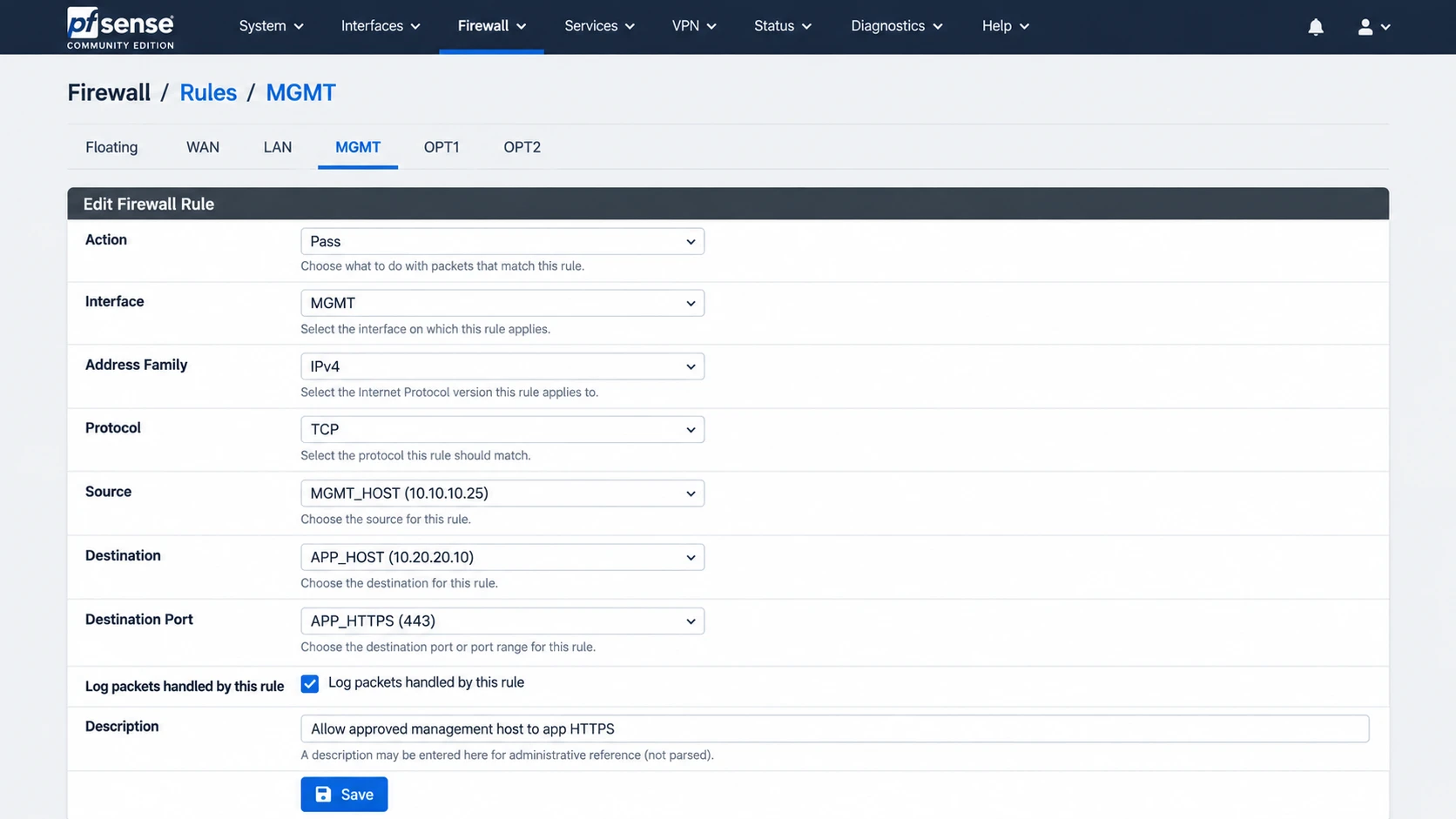
Illustration: The narrow MGMT rule uses the three aliases created in Step 2 and enables logging for the pilot.
Inspect the Loaded Alias and Rule Match
InspectionUse Diagnostics > Tables to check the addresses loaded for a host or network alias, especially if the alias contains a hostname. Then check Status > System Logs > Firewall after a test connection. The log’s interface, source, destination, and rule information should match the approved flow. An empty log may mean the rule did not match, logging is disabled, or an established state handled the traffic.
Diagnostics > Tables > select MGMT_HOST or APP_HOSTStatus > System Logs > Firewall > filter for source/destination❯ What to Verify
Alias contents match the approved values and a new test connectionmatches the intended pass rule.Run Positive and Negative Tests
ValidationFrom 10.10.10.25, connect to the application on TCP 443 and verify the actual application response. Repeat from a second management host that is not in the alias. That host should fail unless another approved rule grants access. Test a different destination port to ensure the exception is not broader than intended. Existing firewall states can persist after a rule change; use a fresh connection and interpret old states separately.
# On an approved Windows test client; replace the lab host.Test-NetConnection 10.20.20.10 -Port 443❯ What to Verify
The approved host reaches TCP 443. The unapproved host and other portremain blocked unless separately authorized.Review Logs and Close the Change
CloseoutKeep logging if the flow needs an audit trail, or reduce verbose pass logging after the pilot if it creates excessive volume. Retain the rule description, owner, test evidence, and rollback instructions. Export an encrypted configuration backup. When troubleshooting later, distinguish a default-deny entry from a block by a specific rule and inspect the rule ID rather than guessing from the packet’s port alone.
Record: alias members | rule order | rule ID | positive/negative tests | log decision | application owner | backup location❯ What to Verify
The approved exception is documented and repeatable, with no unintendedaccess shown by the negative tests.