
Linux Shell Environment: Variables, PATH, and Startup Files
Before you begin
- Applies to:Linux with Bash 4 or later. Fish, Zsh, and POSIX sh use different startup rules.
- Where to start:Open Bash with your regular account.
- What you need:Have standard GNU core utilities and a text editor. The exercises do not require root access.
Guide tools
A command can work in your terminal and fail in a script because the two processes received different environments. This guide follows a variable from a Bash shell into a child process, then builds an isolated startup-file lab before making a deliberate user-level change.
Command outputs below are representative. Usernames and paths vary.
Identify the Shell That Is Actually Running
InspectThe configured login shell and the current process can differ. Open Bash for this exercise, then inspect its version, process, interactive flag and login mode. The SHELL variable usually describes your configured shell; it does not prove which program is running now.
bashprintf 'Bash version: %s\n' "$BASH_VERSION"ps -p "$$" -o pid=,comm=case $- in *i*) printf 'interactive\n';; *) printf 'non-interactive\n';; esacif shopt -q login_shell; then printf 'login\n'; else printf 'non-login\n'; fi❯ Illustrative Output (Results Vary)
Bash version: 5.2.21(1)-release 1427 bashinteractivenon-loginCompare a Shell Variable with an Exported Variable
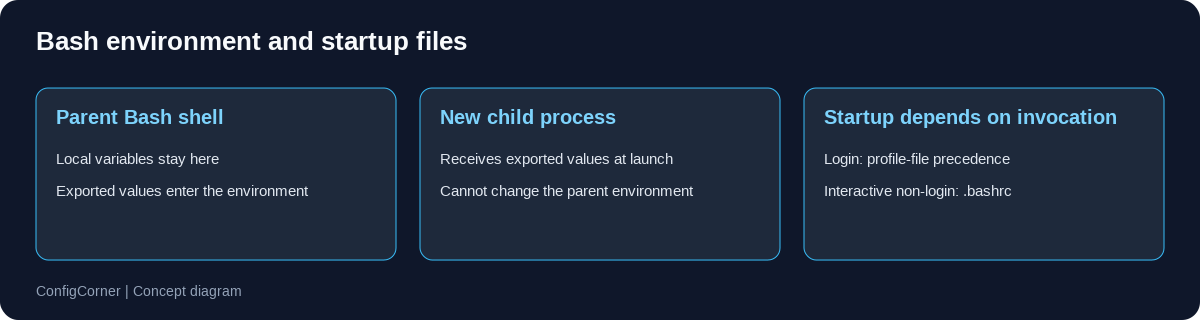
InheritanceAssignment creates a variable in this shell. Export marks it for inclusion in the environment passed to future child processes. The child below starts with startup files disabled and an empty environment, so inherited settings cannot disguise the result.
env -i PATH=/usr/bin:/bin bash --noprofile --norc -c ' CC_LOCAL=local-only export CC_EXPORTED=child-visible bash --noprofile --norc -c '\''printf "local=%s exported=%s\n" "${CC_LOCAL-unset}" "$CC_EXPORTED"'\'''❯ Illustrative Output (Results Vary)
local=unset exported=child-visibleCreate an Isolated Startup-File Lab
PracticeCreate a unique directory and keep its path in this shell. The following exercises point a new Bash process at this temporary home, so they do not overwrite your real startup files. Stay in the same shell until cleanup.
CC_ENV_LAB=$(mktemp -d "${TMPDIR:-/tmp}/cc-env.XXXXXXXX")printf 'Practice directory: %s\n' "$CC_ENV_LAB"mkdir "$CC_ENV_LAB/bin"printf '%s\n' 'export CC_FROM_PROFILE=profile' > "$CC_ENV_LAB/.profile"printf '%s\n' 'export CC_FROM_BASHRC=bashrc' > "$CC_ENV_LAB/.bashrc"Test Login-File Precedence
Startup FilesA Bash login shell reads the system profile, then the first readable user file among .bash_profile, .bash_login, and .profile. Test the fallback, then add a higher-priority file. System profiles remain distribution-controlled and can introduce other settings.
env -i HOME="$CC_ENV_LAB" PATH=/usr/bin:/bin bash --login -c \ 'printf "profile=%s bash_profile=%s\n" "${CC_FROM_PROFILE-unset}" "${CC_FROM_BASH_PROFILE-unset}"'printf '%s\n' 'export CC_FROM_BASH_PROFILE=bash_profile' > "$CC_ENV_LAB/.bash_profile"env -i HOME="$CC_ENV_LAB" PATH=/usr/bin:/bin bash --login -c \ 'printf "profile=%s bash_profile=%s\n" "${CC_FROM_PROFILE-unset}" "${CC_FROM_BASH_PROFILE-unset}"'❯ Illustrative Output (Results Vary)
profile=profile bash_profile=unsetprofile=unset bash_profile=bash_profileCompare Interactive and Script Startup
InvocationA local interactive non-login Bash reads .bashrc. An ordinary non-interactive script does not use that file automatically. The interactive test may print terminal job-control warnings when run without a terminal; focus on the variable result. Remote-shell detection, invocation as sh, and privileged mode have additional rules.
env -i HOME="$CC_ENV_LAB" PATH=/usr/bin:/bin bash --noprofile -ic \ 'printf "interactive rc=%s\n" "${CC_FROM_BASHRC-unset}"'env -i HOME="$CC_ENV_LAB" PATH=/usr/bin:/bin bash --noprofile -c \ 'printf "script rc=%s\n" "${CC_FROM_BASHRC-unset}"'❯ Illustrative Output (Results Vary)
interactive rc=bashrcscript rc=unsetInspect Command Lookup and PATH Order
Command ResolutionPATH is an ordered, colon-separated directory list. A command may also resolve to an alias, function or builtin. Use type to see those layers. Clear Bash’s command cache after changing installed commands or PATH if lookup appears stale.
printf '%s\n' "$PATH" | tr ':' '\n'type -a bashcommand -v bashhash -rRun a Harmless Command from a Custom Directory
PATH ExerciseCreate a command with a unique name, mark it executable, and expose it only to a child shell. The parent PATH remains intact. Explicit environment configuration makes the example repeatable.
cat > "$CC_ENV_LAB/bin/cc-env-hello" <<'EOF'#!/bin/shprintf 'ConfigCorner environment lab\n'EOFchmod 0700 "$CC_ENV_LAB/bin/cc-env-hello"env -i PATH="/usr/bin:/bin:$CC_ENV_LAB/bin" bash --noprofile --norc -c \ 'command -v cc-env-hello; cc-env-hello'Make a Reviewed User-Level PATH Change
Optional PersistenceFirst inspect which startup files already exist. Back up the one you intend to edit without replacing another backup. In your editor, add the block below to the user login file Bash actually reads. Do not create a new .bash_profile casually: it can hide an existing .profile. A profile that intentionally sources another file should retain that behavior.
Create ~/.local/bin if needed and confirm that only your account can change its contents. The guard prevents duplicate entries. Open a fresh login session to apply the change; sourcing the entire profile can repeat unrelated startup actions.
ls -ld "$HOME"/.bash_profile "$HOME"/.bash_login "$HOME"/.profile 2>/dev/nullmkdir -p "$HOME/.local/bin"ls -ld "$HOME/.local" "$HOME/.local/bin"
# Add this block with your editor to the selected login file:case ":$PATH:" in *":$HOME/.local/bin:"*) ;; *) PATH="$PATH:$HOME/.local/bin" ;;esacexport PATHDiagnose Terminal Versus Automation Differences
TroubleshootingCompare the user, interpreter, working directory, PATH and only the specific variables the application requires. A service or scheduled job needs its own configuration. An absolute executable path avoids lookup ambiguity but does not supply missing arguments, permissions or environment. Service environment syntax belongs to the service manager, not to Bash startup files.
idpwdprintf 'PATH=%s\n' "$PATH"command -v cc-env-hello || printf 'The practice command is not in this PATH\n'env -i PATH=/usr/bin:/bin bash --noprofile --norc -c \ 'printf "clean PATH=%s\n" "$PATH"; command -v bash'Remove the Practice Files and Verify Rollback
CleanupRemove only the named files created in this unique lab. The directory removals fail if unexpected files remain. If you performed the optional persistent change, remove only its added block in your editor and open a fresh session. Leave a pre-existing ~/.local/bin and its contents intact.
if [[ -n ${CC_ENV_LAB-} && -d $CC_ENV_LAB ]]; then rm -- "$CC_ENV_LAB/bin/cc-env-hello" "$CC_ENV_LAB/.profile" \ "$CC_ENV_LAB/.bashrc" "$CC_ENV_LAB/.bash_profile" rmdir -- "$CC_ENV_LAB/bin" "$CC_ENV_LAB"fiunset CC_ENV_LABSee the GNU Bash startup-file reference, invocation options, and Bash variables. Continue with pipes and redirection or systemd service overrides.
Your feedback keeps these production procedures accurate and battle-tested.