
Domain Controller Promotion, Replica Replacement & Health Gate Handover
Before you begin
- Applies to:Controlled promotion or replacement of an Active Directory domain controller.
- Where to start:Start from an authorized directory administration workstation and confirm which existing controller provides DNS and replication.
- What you need:Have the target server, site and DNS settings, directory credentials, a valid backup, and a verified healthy replication partner.
Guide tools
Scope, Architecture & Replacement Scenarios
This standard operating procedure governs the controlled promotion, lifecycle replacement, and emergency substitution of Domain Controllers (DCs) within the enterprise forest.
Active Directory Domain Services (AD DS) is fundamentally a distributed multi-master system. Replacing a failed, degraded, or end-of-life DC requires strict adherence to operational health gates to ensure no directory replication errors, tombstoned objects, or orphaned DNS records enter the forest topology.
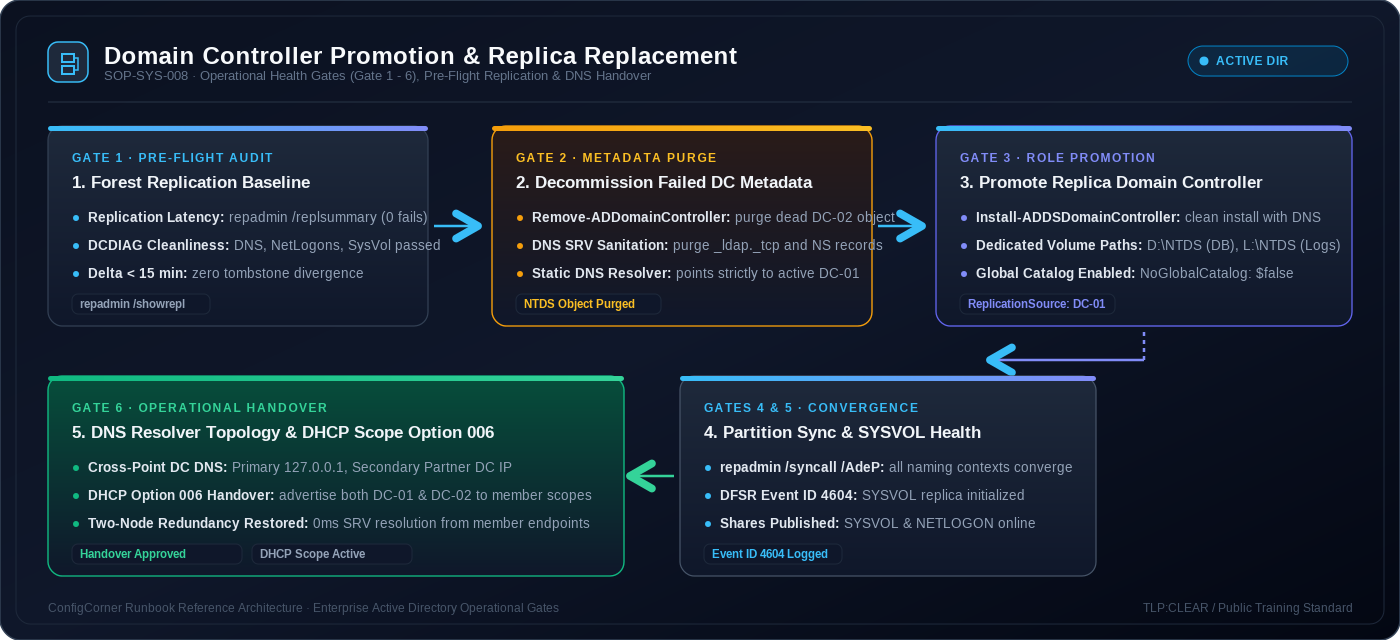
DC Replica Replacement Health Gates: Strict operational progression from Gate 1 (pre-flight replication baseline) through Gate 6 (DHCP Option 006 member handover), ensuring zero orphaned metadata, intact DFSR SYSVOL synchronization, and continuous high-availability directory service.
Common Replacement Scenarios:
- Scenario A (Planned Hardware Refresh / Migration): Retiring aging hardware or migrating from Windows Server 2019/2022 to Windows Server 2025.
- Scenario B (Unplanned Catastrophic Failure): Replacing an unrecoverable DC whose OS, storage, or hypervisor suffered permanent loss.
Pre-Flight Forest Health Gates (Gate 1)
Execute on the surviving primary Domain Controller (DC-01) before touching any replacement hardware.
Validate Existing Forest Replication Baseline
Replication BaselineVerify that directory replication across surviving Domain Controllers has zero errors and delta latency is under 15 minutes.
# Run replication summary forest-widerepadmin /replsummary
# Query for replication errors onlyrepadmin /showrepl * /errorsonly
❯ Illustrative Output (Results Vary)
Source DSA          largest delta    fails/total %%   errorDC-01                      04m:12s    0 /   5    0DC-02                      06m:40s    0 /   5    0
Destination DSA largest delta fails/total %% errorDC-01 06m:40s 0 / 5 0DC-02 04m:12s 0 / 5 0Validate Directory Services Diagnostics (DCDIAG)
Directory DiagnosticsEnsure core directory services, DNS resolution, and Kerberos KDC functionality are operational on surviving DCs.
dcdiag /test:Replications /test:DNS /test:NCSecDesc /test:NetLogons /test:SysVolCheck❯ Illustrative Output (Results Vary)
All tested modules must return "passed test <TestName>".Any failure must be remediated before introducing a new DC.Execution: Decommissioning Failed DC Metadata (Gate 2)
Execute Metadata Cleanup of the Replaced Domain Controller
Metadata CleanupIf replacing a failed or dead DC (DC-02), purge its directory object, NTDS Settings, and Kerberos identities from Active Directory metadata before reusing its hostname or IP address.
# On DC-01: Remove dead Domain Controller object authoritatively$DeadDC = "DC-02"Remove-ADDomainController -Identity $DeadDC -Confirm:$false
Write-Host "[+] Metadata cleanup completed for $DeadDC." -ForegroundColor Green
# Verify NTDS Settings object removal$DN = "CN=NTDS Settings,CN=$DeadDC,CN=Servers,CN=Default-First-Site-Name,CN=Sites,CN=Configuration,DC=corp,DC=internal"Get-ADObject -Identity $DN -ErrorAction SilentlyContinue
❯ Illustrative Output (Results Vary)
Get-ADObject returns null, confirming complete removal of the NTDS Settings instance.Purge Stale DNS SRV and NS Records
DNS SanitationClean stale name server and service locator records associated with the retired DC from forward lookup and _msdcs zones.
# In elevated PowerShell on DC-01:$DeadDC = "DC-02"$Zones = @("corp.internal", "_msdcs.corp.internal")
foreach ($Zone in $Zones) {    # Remove stale NS records    Get-DnsServerResourceRecord -ZoneName $Zone -RRType NS |        Where-Object { $_.RecordData.NameServer -like "*$DeadDC*" } |        Remove-DnsServerResourceRecord -ZoneName $Zone -Confirm:$false
    # Remove stale SRV locator records    Get-DnsServerResourceRecord -ZoneName $Zone -RRType SRV |        Where-Object { $_.RecordData.DomainName -like "*$DeadDC*" } |        Remove-DnsServerResourceRecord -ZoneName $Zone -Confirm:$false}
❯ Illustrative Output (Results Vary)
Query DNS SRV records:Resolve-DnsName -Name "_ldap._tcp.dc._msdcs.corp.internal" -Type SRVConfirm DC-02 does not appear.Execution: Staging Replacement Host & Promotion (Gate 3)
Configure Network Parameters & Static DNS
Network StagingOn the replacement server (DC-02-NEW), configure static networking. The primary DNS resolver must strictly point to surviving DC-01.
# On DC-02-NEW:$NIC = (Get-NetAdapter | Where-Object Status -eq 'Up' | Select-Object -First 1).Name
# 1. Assign static IP address and subnetNew-NetIPAddress -InterfaceAlias $NIC -IPAddress "10.10.10.11" -PrefixLength 24 -DefaultGateway "10.10.10.1"
# 2. Point DNS strictly to surviving active partner DC (DC-01)Set-DnsClientServerAddress -InterfaceAlias $NIC -ServerAddresses ("10.10.10.10")
# 3. Disable NetBIOS over TCP/IPSet-ItemProperty -Path "HKLM:SYSTEM\CurrentControlSet\Services\NetBT\Parameters\Interfaces\*" -Name "NetbiosOptions" -Value 2
# 4. Join domain as member server and rebootAdd-Computer -DomainName "corp.internal" -Restart
❯ Illustrative Output (Results Vary)
After reboot, verify domain membership:(Get-CimInstance Win32_ComputerSystem).PartOfDomain returns True.Install AD DS & DNS Roles on Replacement Server
Role BinariesInstall the required directory services binaries and management tools prior to replica promotion.
Install-WindowsFeature -Name AD-Domain-Services, DNS, RSAT-ADDS -IncludeManagementTools❯ Illustrative Output (Results Vary)
Success Restart Needed Exit Code Feature Result------- -------------- --------- --------------True No Success {Active Directory Domain Services, DNS Server...}Promote Replacement Server as Replica Domain Controller
Replica PromotionPromote the replacement server into the existing domain, enabling Global Catalog and placing the NTDS database and logs on dedicated volumes.
$DSRMPassword = Read-Host -Prompt "Enter DSRM Administrator Password" -AsSecureString
Install-ADDSDomainController `    -DomainName "corp.internal" `    -InstallDns:$true `    -CreateDnsDelegation:$false `    -SiteName "Default-First-Site-Name" `    -ReplicationSourceDC "DC-01.corp.internal" `    -NoGlobalCatalog:$false `    -DatabasePath "D:\NTDS" `    -LogPath "L:\NTDS" `    -SysvolPath "C:\Windows\SYSVOL" `    -SafeModeAdministratorPassword $DSRMPassword `    -Force:$true
❯ Illustrative Output (Results Vary)
Server initiates automated promotion, synchronizes schema and partitions from DC-01, and restarts.Execution: Post-Promotion Health Gates (Gates 4 & 5)
Converge Replication & Validate SYSVOL Publication
Replication ConvergenceFollowing promotion reboot, verify that DFSR has initialized SYSVOL and that all replication partitions are in sync.
# 1. Replicate all naming contexts across all partnersrepadmin /syncall /AdeP
# 2. Check DFSR event log for SYSVOL initializationGet-WinEvent -LogName "DFS Replication" -MaxEvents 10 |    Where-Object { $_.Id -in 4604, 4614 } |    Select-Object TimeCreated, Id, Message
# 3. Verify SYSVOL and NETLOGON shares are activeGet-SmbShare -Name SYSVOL, NETLOGON
❯ Illustrative Output (Results Vary)
SyncAll reported no errors.Event ID 4604: "The DFS Replication service successfully initialized the SYSVOL replica."SYSVOL and NETLOGON shares report State: NonExistent = False.Reconfigure Client DNS Resolver Topology on Both DCs
DNS TopologyReconfigure DNS resolver settings so each Domain Controller queries itself (or loopback) as primary, and the partner DC as secondary.
# On DC-02 (Replacement DC):$NIC = (Get-NetAdapter | Where-Object Status -eq 'Up' | Select-Object -First 1).NameSet-DnsClientServerAddress -InterfaceAlias $NIC -ServerAddresses ("127.0.0.1", "10.10.10.10")
# On DC-01 (Partner DC):$NIC1 = (Get-NetAdapter | Where-Object Status -eq 'Up' | Select-Object -First 1).NameSet-DnsClientServerAddress -InterfaceAlias $NIC1 -ServerAddresses ("127.0.0.1", "10.10.10.11")
❯ Illustrative Output (Results Vary)
Run Get-DnsClientServerAddress on both DCs:Verify primary DNS is 127.0.0.1 and secondary is the partner DC IP.Execution: Network Handover (Gate 6)
Hand Over DHCP Scope Options and Member Pointers
DHCP HandoverUpdate enterprise network resolvers to restore two-node DNS redundancy across member systems.
# Update DHCP DNS Server Scope Option (Option 006) on Corp DHCPSet-DhcpServerv4OptionValue -ScopeId 10.10.20.0 -OptionId 6 -Value @("10.10.10.10", "10.10.10.11")Set-DhcpServerv4OptionValue -ScopeId 10.10.30.0 -OptionId 6 -Value @("10.10.10.10", "10.10.10.11")
# Flush and test resolution from an administrative workstation:Clear-DnsClientCacheResolve-DnsName -Name "corp.internal" -Server "10.10.10.11"
❯ Illustrative Output (Results Vary)
Name Type TTL Section IPAddress---- ---- --- ------- ---------corp.internal A 600 Answer 10.10.10.10corp.internal A 600 Answer 10.10.10.11Rollback & Unsuccessful Promotion Decommissioning
Abort Promotion and Purge Incomplete Metadata
Rollback AbortIf the replacement promotion fails mid-way, replication locks up, or severe hardware defects are identified, cleanly abort promotion and purge orphaned records from DC-01.
# 1. Power off replacement DC-02 immediately# 2. On DC-01, force remove orphaned replica record:Remove-ADDomainController -Identity "DC-02" -Confirm:$false
# 3. Clean incomplete DNS records:$Record = Get-DnsServerResourceRecord -ZoneName "_msdcs.corp.internal" -RRType NS | Where-Object {$_.RecordData.NameServer -like "*DC-02*"}if ($Record) { Remove-DnsServerResourceRecord -ZoneName "_msdcs.corp.internal" -Name $Record.HostName -RRType NS -Confirm:$false }
# 4. Revert DHCP Option 006 to point solely to DC-01:Set-DhcpServerv4OptionValue -ScopeId 10.10.20.0 -OptionId 6 -Value @("10.10.10.10")
Operational Compliance & Handover Sign-off
| Health Gate | Operational Requirement | Approver | Sign-Off |
|---|---|---|---|
| Gate 1: Pre-Flight Audit | repadmin /replsummary reports 0 failures | Systems Administration Team | Approved |
| Gate 2: Metadata Cleanup | Dead DC purged from AD and DNS SRV | Systems Administration Team | Approved |
| Gate 3: Promotion | Clean install with dedicated database paths | Lead Systems Administrator | Approved |
| Gate 4: Partition Sync | All partitions converge across partners | Systems Administration Team | Approved |
| Gate 5: SYSVOL Health | Event ID 4604 logged; shares published | Systems Administration Team | Approved |
| Gate 6: Network Handover | DHCP Scope Option 006 updated and active | Infrastructure Operations | Approved |
Your feedback keeps these production procedures accurate and battle-tested.