
Troubleshoot a 169.254 IP Address on Windows: A Beginner Guide
Before you begin
- Applies to:Windows 11 when the active adapter shows a 169.254.x.x IPv4 address.
- Where to start:Open PowerShell 7 or later on the affected PC.
- What you need:Identify the network adapter you currently use. DHCP normally supplies its network settings automatically.
Guide tools
Troubleshooting Steps
Confirm which adapter has the address
Start hereFind the adapter you are actually using. Check DHCP Enabled, IPv4 Address and Default Gateway. An automatically assigned 169.254 address usually means the adapter has no usable DHCP lease. Ignore inactive adapters. This IPv4 symptom does not establish whether IPv6 works.
ipconfig.exe /all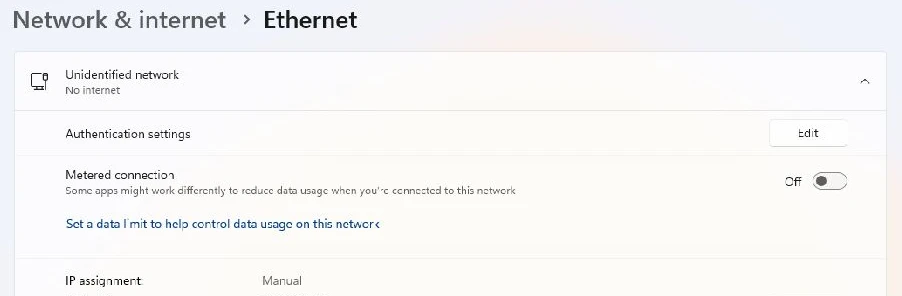
Figure 1: For Ethernet, open Settings → Network & internet → Ethernet and read IP assignment. This VM uses Manual. For an adapter that should get an address from DHCP, look for Automatic (DHCP), then check the actual IPv4 address with the command above.
Check the network before renewing
Narrow the causeVerify the intended Wi-Fi network or Ethernet port and check whether another device gets a lease on the same network. If several devices are affected, tell the network owner. Check for a disconnected cable, incorrect Wi-Fi network, or a recently changed switch port. Retry after fixing the confirmed issue.
Renew only the affected adapter
VerifyFrom a local elevated session, replace Wi-Fi with the actual adapter name. Run the renewal only if DHCP is supposed to be enabled. Verify that the adapter shows an address in the expected range, a gateway where required, and a lease time. If it stays on 169.254, record the time and adapter and ask the network owner to check DHCP.
What you should see · The affected adapter receives an address from the expected subnet and shows the expected gateway if the network supplies one.
If you see something else · If the adapter keeps a 169.254 address, record the adapter name and renewal error. Check whether another device on the same network gets a lease before changing the affected PC.
$Adapter = 'Wi-Fi'ipconfig.exe /renew "$Adapter"ipconfig.exe /allReference
Your feedback keeps these production procedures accurate and battle-tested.