
Microsoft Entra and Hybrid Identity Security Incident Response
Before you begin
- Applies to:Authorized incident response across Microsoft Entra ID, Microsoft 365, and on-premises Active Directory.
- Where to start:Start with the incident lead and confirm the affected tenant, forest, and identities.
- What you need:Have authorized access to the relevant logs and admin consoles, an incident record, and approved containment and recovery contacts.
Guide tools
Scope, Threat Vectors & Incident Triggers
This emergency runbook establishes the mandatory triage, containment, forensic preservation, and recovery workflows for compromised cloud and hybrid identities across Microsoft Entra ID (formerly Azure AD), Microsoft 365, and on-premises Active Directory.
Cloud-based identity attacks bypass perimeter firewalls through stolen session cookies, Adversary-in-the-Middle (AiTM) phishing, illicit OAuth app consent grants, and forged service principal credentials. Responders must execute coordinated containment across both cloud and on-premises environments simultaneously.
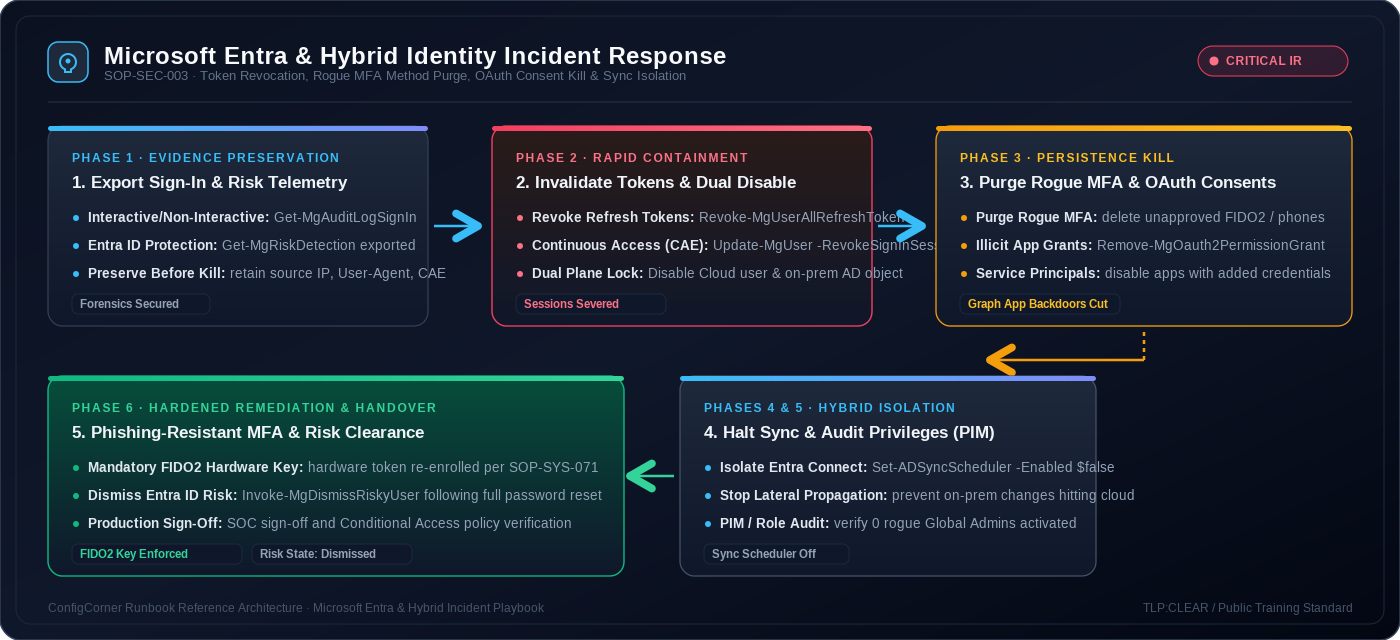
Microsoft Entra & Hybrid Identity Incident Response Pipeline: Rapid coordinated containment across cloud and on-premises planes: preserve audit/risk telemetry, revoke all active OAuth refresh and Continuous Access Evaluation (CAE) sessions, disable synchronized accounts, purge rogue MFA methods and illicit app consents, freeze sync engines, and enforce phishing-resistant FIDO2 hardware credentials.
Pre-Incident Access & Tooling Baseline
Responders require an administrative workstation equipped with the Microsoft Graph PowerShell SDK and credentials for an emergency break-glass account ([email protected]):
# Install and connect to Microsoft Graph with incident response scopesInstall-Module Microsoft.Graph -Scope CurrentUser -Repository PSGallery -Force
Connect-MgGraph -Scopes @(    "User.ReadWrite.All",    "AuditLog.Read.All",    "Directory.ReadWrite.All",    "Application.ReadWrite.All",    "IdentityRiskEvent.Read.All",    "Policy.Read.All")
Execution: Phase 1 — Forensic Evidence Preservation
Export Compromised User Sign-In and Risk Logs
Forensic PreservationBefore terminating active sessions, export live sign-in telemetry, IP addresses, user agent strings, and risk detections for forensic preservation and attribution.
$LogDir = "C:\Forensics\Incidents\$(Get-Date -Format 'yyyyMMdd_HHmmss')_$TargetUPN"New-Item -ItemType Directory -Path $LogDir -Force
# 1. Export interactive and non-interactive sign-in logs (last 7 days)Get-MgAuditLogSignIn -Filter "userPrincipalName eq '$TargetUPN'" -All | Select-Object CreatedDateTime, AppDisplayName, IPAddress, ClientAppUsed, UserAgent, Status, RiskDetail, ConditionalAccessStatus | Export-Csv -Path "$LogDir\SignIns_$TargetUPN.csv" -NoTypeInformation
# 2. Export real-time risk detections from Entra ID ProtectionGet-MgRiskDetection -Filter "userPrincipalName eq '$TargetUPN'" -All | Export-Csv -Path "$LogDir\RiskDetections_$TargetUPN.csv" -NoTypeInformation
# 3. Export directory audit events (modifications performed by or on the account)Get-MgAuditLogDirectoryAudit -Filter "targetResources/any(c:c/userPrincipalName eq '$TargetUPN')" -All | Export-Csv -Path "$LogDir\DirectoryAudit_$TargetUPN.csv" -NoTypeInformation❯ Illustrative Output (Results Vary)
Confirm CSV files are populated in $LogDir and contain timestamped sign-in and IP attribution data.Execution: Phase 2 — Coordinated Cloud & On-Premises Containment
Revoke Active Refresh Tokens & Web Sessions
Token RevocationImmediately revoke all active OAuth refresh tokens, session cookies, and Continuous Access Evaluation (CAE) tokens to disconnect the attacker from Teams, Outlook Web App, SharePoint, and Azure Portal.
# 1. Invalidate all active OAuth tokens across Microsoft 365$User = Get-MgUser -UserId $TargetUPNRevoke-MgUserAllRefreshToken -UserId $User.Id
# 2. Force session termination in Continuous Access Evaluation (CAE)Update-MgUser -UserId $User.Id -RevokeSignInSessions $trueWrite-Host "[-] All active tokens revoked for $($User.UserPrincipalName)." -ForegroundColor Red
❯ Illustrative Output (Results Vary)
Query user token revocation timestamp:(Get-MgUser -UserId $User.Id -Property RefreshTokensValidFromDateTime).RefreshTokensValidFromDateTimeMatches current UTC timestamp. Attacker sessions severed.Disable Account in Cloud and On-Premises Active Directory
Account QuarantinePrevent further authentication attempts while investigations are ongoing across both directory planes.
# 1. Disable cloud account in Entra IDUpdate-MgUser -UserId $User.Id -AccountEnabled:$false
# 2. If user is synchronized from on-premises AD, disable immediately in Active Directory:$SamAccountName = ($TargetUPN -split "@")[0]if (Get-ADUser -Filter "SamAccountName -eq '$SamAccountName'" -ErrorAction SilentlyContinue) {    Disable-ADAccount -Identity $SamAccountName    Move-ADObject -Identity (Get-ADUser $SamAccountName).DistinguishedName -TargetPath "OU=Quarantine,DC=corp,DC=internal"    Write-Host "[-] Synchronized on-premises AD account disabled and quarantined." -ForegroundColor Yellow}
❯ Illustrative Output (Results Vary)
(Get-MgUser -UserId $User.Id).AccountEnabled returns False.(Get-ADUser $SamAccountName).Enabled returns False.Audit and Purge Rogue MFA Authentication Methods
MFA SanitationAttackers frequently add rogue FIDO2 keys, phone numbers, or Authenticator apps to maintain persistence. Purge all unapproved MFA methods.
# List all registered authentication methods for the userGet-MgUserAuthenticationMethod -UserId $User.Id
# 1. Remove rogue Software OATH tokens / Authenticator apps:Get-MgUserAuthenticationMicrosoftAuthenticatorMethod -UserId $User.Id | ForEach-Object {    Remove-MgUserAuthenticationMicrosoftAuthenticatorMethod -UserId $User.Id -MicrosoftAuthenticatorAuthenticationMethodId $_.Id}
# 2. Remove rogue FIDO2 security keys:Get-MgUserAuthenticationFido2Method -UserId $User.Id | ForEach-Object {    Remove-MgUserAuthenticationFido2Method -UserId $User.Id -Fido2AuthenticationMethodId $_.Id}
# 3. Remove rogue phone numbers:Get-MgUserAuthenticationPhoneMethod -UserId $User.Id | ForEach-Object {    Remove-MgUserAuthenticationPhoneMethod -UserId $User.Id -PhoneAuthenticationMethodId $_.Id}
❯ Illustrative Output (Results Vary)
Re-query Get-MgUserAuthenticationMethod:Confirm only corporate-approved methods remain on target profile.Execution: Phase 3 — Malicious Application & OAuth Consent Remediation
Audit and Revoke Illicit OAuth App Permissions
OAuth RevocationAttackers frequently abuse user consent to register malicious multi-tenant apps that maintain persistence via Graph API even after the user’s password is changed.
# 1. Audit all OAuth2 permissions consented to by the target user$Grants = Get-MgOauth2PermissionGrant -Filter "principalId eq '$($User.Id)'" -All
foreach ($Grant in $Grants) {    $App = Get-MgServicePrincipal -ServicePrincipalId $Grant.ClientId    Write-Warning "Consented App Detected: $($App.DisplayName) | Permissions: $($Grant.Scope)"
    # 2. Revoke the unauthorized permission grant immediately    Remove-MgOauth2PermissionGrant -OAuth2PermissionGrantId $Grant.Id    Write-Host "[-] Revoked OAuth consent: $($Grant.Id)" -ForegroundColor Red}
❯ Illustrative Output (Results Vary)
Run: Get-MgOauth2PermissionGrant -Filter "principalId eq '$($User.Id)'"Must return 0 results.Identify & Disable Suspect Service Principals and Credentials
Credential PurgeCheck if the attacker created new App Registrations or added credentials (certificates/passwords) to existing Enterprise Applications.
# Query directory audit log for application credential additions (last 72 hours)Get-MgAuditLogDirectoryAudit -Filter "activityDisplayName eq 'Add service principal credentials'" -All |    Select-Object ActivityDateTime, TargetResources, InitiatedBy | Format-Table
# Disable suspect Service Principal immediately:$SuspectAppId = "00000000-0000-0000-0000-000000000000" # Replace with target IDUpdate-MgServicePrincipal -ServicePrincipalId $SuspectAppId -AccountEnabled:$false
❯ Illustrative Output (Results Vary)
(Get-MgServicePrincipal -ServicePrincipalId $SuspectAppId).AccountEnabled reports False.Execution: Phase 4 — Entra Connect Synchronization Isolation
Isolate Entra Connect Sync Engine (If On-Premises Breached)
Sync IsolationIf the compromise originated from on-premises Active Directory or involves Domain Controller lateral movement, halt Entra Connect synchronization to prevent on-premises attackers from modifying cloud administrators or pushing malicious attributes.
# On the primary Entra Connect server:Import-Module ADSync
# 1. Disable the automated synchronization schedulerSet-ADSyncScheduler -SyncCycleEnabled $false
# 2. Verify current sync scheduler stateGet-ADSyncScheduler | Select-Object SyncCycleEnabled, NextSyncCycleStartTimeInUTC
❯ Illustrative Output (Results Vary)
SyncCycleEnabled : FalseNextSyncCycleStartTimeInUTC: DisabledCloud identity directory isolated from on-premises directory modifications.Execution: Phase 5 — Privileged Identity & Policy Audit
Audit Privileged Identity Management (PIM) and Directory Roles
Privilege AuditVerify whether the attacker activated or elevated any roles into Global Administrator, Privileged Role Administrator, or Exchange Administrator.
# Query all active Directory Role assignmentsGet-MgRoleManagementDirectoryRoleAssignment -All | ForEach-Object { $RoleDef = Get-MgRoleManagementDirectoryRoleDefinition -UnifiedRoleDefinitionId $_.RoleDefinitionId $Principal = Get-MgDirectoryObject -DirectoryObjectId $_.PrincipalId [PSCustomObject]@{ RoleName = $RoleDef.DisplayName PrincipalUPN = $Principal.AdditionalProperties["userPrincipalName"] PrincipalType = $Principal.AdditionalProperties["@odata.type"] }} | Format-Table -AutoSize❯ Illustrative Output (Results Vary)
Confirm no unexpected accounts or service principals hold Tier-0 directory roles.Execution: Phase 6 — Remediation, FIDO2 Re-issue & Handover
Re-Enable User Account with Phishing-Resistant MFA
Phishing-Resistant MFAFollowing full containment, re-enable the user with a temporary password and mandate registration of a FIDO2 hardware security key.
# 1. Reset user password to a cryptographically secure value$NewTempPass = (-join ((65..90) + (97..122) + (48..57) + 33..38 | Get-Random -Count 24 | ForEach-Object {[char]$_}))Update-MgUser -UserId $User.Id `    -PasswordProfile @{ ForceChangePasswordNextSignIn = $true; Password = $NewTempPass } `    -AccountEnabled:$true
# 2. Reset risk state in Microsoft Entra ID ProtectionInvoke-MgDismissRiskyUser -UserIds @($User.Id)Write-Host "[+] User account re-enabled. Risk state reset." -ForegroundColor Green
❯ Illustrative Output (Results Vary)
Query risk state:Get-MgRiskyUser -UserId $User.Id | Select-Object UserPrincipalName, RiskStateRiskState: dismissedRollback & Closeout Sign-Off
Restore Legitimate Enterprise Application or User Access
Rollback RestorationIf an account or application was disabled mistakenly during containment, safely re-enable the cleared user identity and restore genuine OAuth permissions.
# 1. Re-enable user in Entra IDUpdate-MgUser -UserId $User.Id -AccountEnabled:$true
# 2. If synchronized, re-enable on-premises AD account and restore original OU:Enable-ADAccount -Identity $SamAccountNameMove-ADObject -Identity (Get-ADUser $SamAccountName).DistinguishedName -TargetPath "OU=Users,OU=Staff,DC=corp,DC=internal"
# 3. Resume Entra Connect scheduler if previously paused:Set-ADSyncScheduler -SyncCycleEnabled $true
SOC Compliance & Incident Sign-off
| Incident Milestone | Mandatory Verification Standard | Approver | Sign-Off |
|---|---|---|---|
| Evidence Preservation | Sign-in and audit logs exported to forensic store | Security Operations | Approved |
| Token Invalidation | Revoke-MgUserAllRefreshToken executed successfully | Security Operations | Approved |
| MFA Sanitization | All unauthorized phone/authenticator methods removed | Security Operations | Approved |
| OAuth Consent Audit | Illicit permission grants revoked; apps neutralized | Lead Systems Administrator | Approved |
| PIM & CA Verification | Zero unauthorized role activations in tenant | CISO | Approved |
| Identity Re-issue | Phishing-resistant FIDO2 hardware key enforced | CISO | Approved |
Your feedback keeps these production procedures accurate and battle-tested.