
Tiered Administration Model & Protected Users Security Baseline
Before you begin
- Applies to:Tiered Active Directory administration on Windows Server 2022 or 2025 using Group Policy and privileged access workstations.
- Where to start:Start from an approved privileged access workstation. Review the tier and account assignments before linking policies.
- What you need:Have delegated AD and Group Policy access, pilot accounts and OUs, and a tested emergency sign-in path. Plan how to reverse pilot changes if access fails.
Guide tools
Scope, Threat Model & Architecture Overview
The single most prevalent root cause of enterprise Active Directory compromise is credential theft from lower-security machines (such as employee workstations infected with infostealers or ransomware) where an administrative account has logged in. Once an administrator logs in, their plaintext credentials, Kerberos tickets, and NTLM hashes remain cached in Local Security Authority Subsystem Service (LSASS) memory.
The Tiered Administration Model enforces strict containment boundaries:
Golden Principle: Credentials from a higher tier must NEVER be entered, cached, or transmitted to a system of a lower tier.
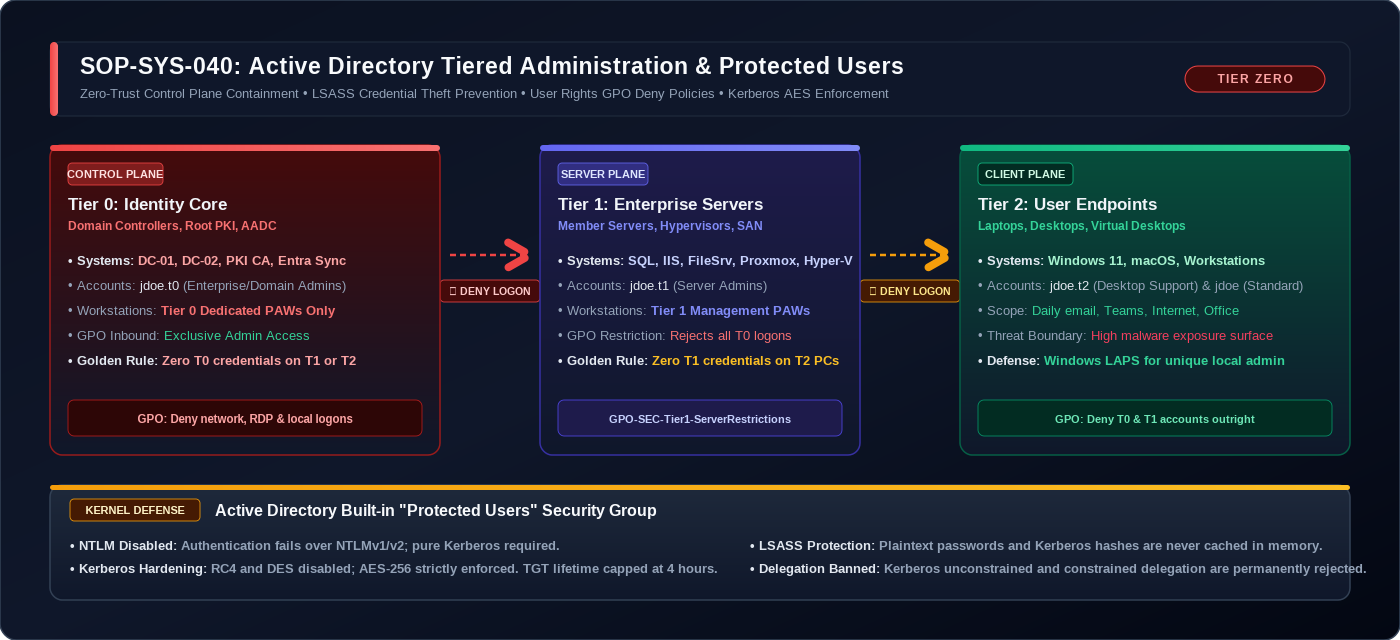
Tiered Administration Security Boundaries: Strict vertical credential isolation between Tier 0 (Identity & Control Plane), Tier 1 (Server & Application Plane), and Tier 2 (Workstation & Endpoint Plane), backed by Dedicated PAWs, Protected Users containment, and LAPS v2.
Directory Structure & Account Provisioning
Create Tiered Organizational Unit (OU) Architecture
Active Directory OUsRun on the PDC Emulator (DC-01) to establish strict structural container boundaries separating Tier 0, Tier 1, and Tier 2 administrative objects and computer accounts.
$BaseDN = (Get-ADDomain).DistinguishedName
# Create Tier 0, 1, and 2 structural containers$OUs = @(    "OU=Tier 0", "OU=Tier 1", "OU=Tier 2",    "OU=Admin Accounts,OU=Tier 0", "OU=Servers,OU=Tier 0", "OU=Groups,OU=Tier 0",    "OU=Admin Accounts,OU=Tier 1", "OU=Servers,OU=Tier 1", "OU=Groups,OU=Tier 1",    "OU=Admin Accounts,OU=Tier 2", "OU=Endpoints,OU=Tier 2", "OU=Groups,OU=Tier 2")
foreach ($OU in $OUs) {    $Name = $OU.Split(',')[0].Replace('OU=', '')    $Path = if ($OU.Contains(',')) { $OU.Substring($OU.IndexOf(',') + 1) + ",$BaseDN" } else { $BaseDN }    New-ADOrganizationalUnit -Name $Name -Path $Path -ProtectedFromAccidentalDeletion $true}
Account Separation Matrix per Administrator
Every systems engineer requires dedicated, partitioned accounts per tier. Standard daily tasks (email, Microsoft Teams, internet browsing) occur exclusively on non-administrative accounts:
| Account Type | Naming Convention | Usage Scope |
|---|---|---|
| Standard User | jdoe | Email, Microsoft Teams, Web browsing, Workstations |
| Tier 2 Admin | jdoe.t2 | Desktop support, workstation software deployment |
| Tier 1 Admin | jdoe.t1 | Managing member servers, SQL, IIS, server patching |
| Tier 0 Admin | jdoe.t0 | Managing Domain Controllers, AD DS, DNS, PKI root |
Group Policy Enforcement: User Rights Assignment
Enforce strict technical logon restrictions via dedicated Group Policy Objects linked to each tier.
Create Tier 0 Logon Restriction GPO
GPO EnforcementCreate GPO GPO-SEC-Tier0-LogonRestrictions and link it to OU=Tier 1 and OU=Tier 2. This guarantees that even if a Tier 0 administrator mistakenly attempts to authenticate or RDP into a member server or desktop, Windows outright rejects the logon, preventing LSASS token creation.
Policy Path:Computer Configuration -> Policies -> Windows Settings -> Security Settings  -> Local Policies -> User Rights Assignment
Deny access to this computer from the network:  -> CORP\Tier 0 Admin Accounts Group  -> CORP\Enterprise Admins  -> CORP\Domain Admins
Deny log on as a batch job:  -> CORP\Tier 0 Admin Accounts Group
Deny log on as a service:  -> CORP\Tier 0 Admin Accounts Group
Deny log on locally:  -> CORP\Tier 0 Admin Accounts Group
Deny log on through Remote Desktop Services:  -> CORP\Tier 0 Admin Accounts Group  -> CORP\Enterprise Admins  -> CORP\Domain Admins
Protected Users Security Group Hardening
Active Directory includes the built-in Protected Users security group (CN=Protected Users,CN=Users,DC=corp,DC=internal). Adding Tier 0 accounts to this group activates non-configurable, native kernel defenses:
Protections Automatically Applied:
- NTLM Disabled: Accounts cannot authenticate using NTLMv1 or NTLMv2.
- Kerberos Weak Ciphers Banned: Kerberos DES and RC4 are disabled; only AES is permitted.
- Credential Delegation Prevented: Unconstrained and constrained Kerberos delegation is rejected.
- TGT Lifetime Restricted: Kerberos Ticket Granting Ticket (TGT) lifetime is capped at 4 hours (default is 10 hours) and cannot be renewed past 4 hours.
- LSASS Plaintext Elimination: Hashes and plaintext credentials are never cached to disk or memory.
Enroll Tier 0 Administrative Accounts into Protected Users
Kernel DefenseQuery all administrative accounts within the Tier 0 organizational unit and add them to the built-in Protected Users security group.
# Query all accounts in Tier 0 Admin OU$BaseDN = (Get-ADDomain).DistinguishedName$Tier0Accounts = Get-ADUser -Filter * -SearchBase "OU=Admin Accounts,OU=Tier 0,$BaseDN"
# Add accounts to Protected Users security groupforeach ($Admin in $Tier0Accounts) {    Add-ADGroupMember -Identity "Protected Users" -Members $Admin.DistinguishedName -Confirm:$false    Write-Host "Enrolled $($Admin.SamAccountName) into Protected Users" -ForegroundColor Green}
Operational Verification & Compliance Audit
Verify Logon Rejection & Kerberos Ticket Lifetime
VerificationPerform verification tests on member servers to confirm logon denial and audit Kerberos encryption and ticket expiration on Domain Controllers.
# Test 1: From a Tier 1 member server, attempt an RDP or PowerShell Remoting session with a Tier 0 account:# Expected Result: "The sign-in method you're trying to use isn't allowed. For more info, contact your network administrator."
# Test 2: Log into a Domain Controller with a Protected User account and inspect active Kerberos tickets:klist
# Expected Output:# Encryption Type: AES-256-CTS-HMAC-SHA1-96# Renew Time: Restricted to <= 4 hours
Rollback & Emergency Access
If an administrator is temporarily locked out of an operational task due to Protected Users restrictions (e.g. an emergency legacy recovery tool requires NTLM):
- Break-Glass Emergency Removal:
Remove-ADGroupMember -Identity "Protected Users" -Members "jdoe.t0" -Confirm:$false- Have the administrator log off and log back on to generate a standard Kerberos TGT.
- Investigate and modernize the legacy tool to support Kerberos AES. Re-enroll the account into Protected Users immediately upon task completion.
Your feedback keeps these production procedures accurate and battle-tested.