
Edit Linux Configuration Files Safely: A Beginner Guide
Before you begin
- Applies to:Linux with Bash, GNU coreutils, diff, and Python 3.
- Where to start:Open a Bash terminal and use the private practice directory created in Step 1.
- What you need:Have nano or Vim available. The exercise uses a sample JSON file that no installed service reads.
Guide tools
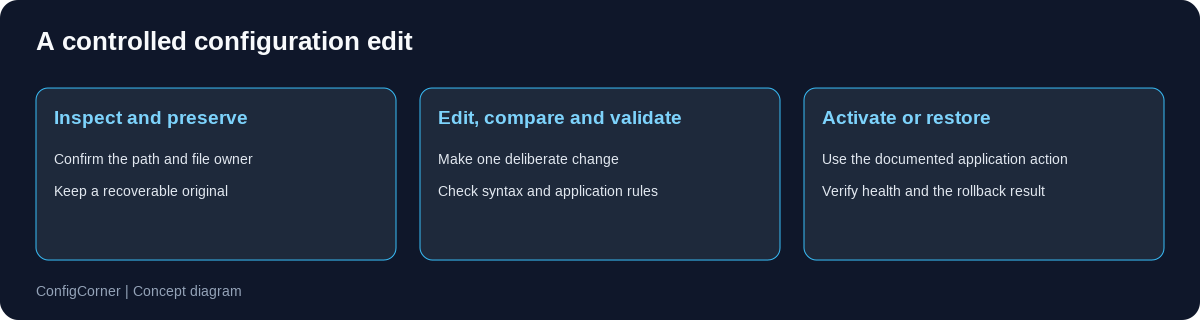
A successful save does not mean a configuration is valid. A repeatable editing workflow identifies the right file, preserves the original, makes a small change, checks the difference, validates it, and plans how to undo it.
This guide uses a private practice directory and a small JSON configuration for a fictional polling application. No installed service reads this file. Use Bash, GNU coreutils, diff, Python 3, and either nano or Vim. Check available editors first; if one is missing, use the other or install it through your approved package-management workflow.
Check the Required Tools
PreflightConfirm that Python and the comparison tools exist. Check editors without assuming both are installed. Keep the same shell for the lab so its directory variable remains available. A missing command is a prerequisite to resolve, not a reason to run an unrelated installation script.
command -v python3command -v diffcommand -v cmpcommand -v nano || printf 'nano is not installed\n'command -v vim || printf 'Vim is not installed\n'Create the Practice Configuration
PracticeCreate a unique private directory and a valid baseline file. The enabled setting is a JSON boolean. The polling interval begins at 30 seconds. Quoted heredoc delimiters keep the shell from expanding text inside the file.
CC_CONFIG_LAB=$(mktemp -d "${TMPDIR:-/tmp}/cc-config.XXXXXXXX") || exit 1cat > "$CC_CONFIG_LAB/app.json" <<'EOF'{ "enabled": true, "poll_seconds": 30}EOFcat -- "$CC_CONFIG_LAB/app.json"Preserve the Original and Inspect Metadata
PracticeCopy the known baseline to a separate filename inside the new lab. The destination is unused. Inspect both files before editing. This user-owned backup demonstrates recovery; a production backup must also preserve the metadata, permissions, labels and extended attributes required by the application.
cp -p -- "$CC_CONFIG_LAB/app.json" "$CC_CONFIG_LAB/app.json.original"ls -l -- "$CC_CONFIG_LAB/app.json" "$CC_CONFIG_LAB/app.json.original"cmp -s -- "$CC_CONFIG_LAB/app.json.original" "$CC_CONFIG_LAB/app.json" \ && printf 'Baseline copy matches\n'Make One Change with nano
Editor Option AIf using nano, open the file and change only poll_seconds from 30 to 60. Save with Ctrl+O, confirm the filename with Enter, then exit with Ctrl+X. The caret in nano shortcuts means Ctrl. Ctrl+G opens help; consult the bottom help lines because shortcuts can be customized.
nano -- "$CC_CONFIG_LAB/app.json"Change: "poll_seconds": 30To: "poll_seconds": 60Save: Ctrl+O, EnterExit: Ctrl+XUse Basic Vim Commands as the Alternative
Editor Option BIf you prefer Vim, use this step instead of the nano edit. Press i to enter Insert mode, change the value, then press Esc to return to Normal mode. Type :wq and Enter to save and quit. To abandon unsaved changes, use Esc followed by :q! and Enter. Work on the lab file so a mode mistake is easy to recover from.
vim -- "$CC_CONFIG_LAB/app.json"i Enter Insert modeEsc Return to Normal mode:wq Save and quit:q! Quit and discard unsaved changesReview the Difference Before Continuing
PracticeA unified diff shows what changed: removed lines start with a minus, added lines with a plus. Its status is zero for no differences, one for differences, and greater than one for an error. The check below distinguishes those results. Expect only the polling value to change.
if diff -u -- "$CC_CONFIG_LAB/app.json.original" "$CC_CONFIG_LAB/app.json"; then printf 'No changes; perform one editor exercise first\n'else CC_DIFF_STATUS=$? if [ "$CC_DIFF_STATUS" -eq 1 ]; then printf 'Differences shown above; review them\n' else printf 'diff failed with status %s; stop and investigate\n' "$CC_DIFF_STATUS" >&2 fifiAdd a Validator for the Lab Schema
PracticePython can check both JSON syntax and the small schema used here. The lab accepts exactly two keys, a boolean enabled value, and an integer interval between 5 and 3600 seconds. It reads data as JSON rather than evaluating configuration as code. Save this validator exactly as shown.
cat > "$CC_CONFIG_LAB/validate-config.py" <<'PY'import jsonimport sysfrom pathlib import Path
def main():    if len(sys.argv) != 2:        print("Usage: validate-config.py FILE", file=sys.stderr)        return 2    try:        with Path(sys.argv[1]).open(encoding="utf-8") as source:            config = json.load(source)    except (OSError, UnicodeError, json.JSONDecodeError) as error:        print(f"Invalid configuration: {error}", file=sys.stderr)        return 1    valid = (        isinstance(config, dict)        and set(config) == {"enabled", "poll_seconds"}        and type(config["enabled"]) is bool        and type(config["poll_seconds"]) is int        and 5 <= config["poll_seconds"] <= 3600    )    if not valid:        print("Expected boolean enabled and integer poll_seconds (5..3600).", file=sys.stderr)        return 1    print("Configuration is valid for the lab schema.")    return 0
if __name__ == "__main__": sys.exit(main())PYTest Acceptance and Rejection
PracticeValidate the edited file, then check a separate candidate whose interval is outside the allowed range. The candidate has valid JSON but invalid application settings, demonstrating why syntax alone is insufficient. Expected statuses are zero for valid data, one for a validation failure and two for incorrect validator usage.
python3 "$CC_CONFIG_LAB/validate-config.py" "$CC_CONFIG_LAB/app.json"printf '{"enabled": true, "poll_seconds": 0}\n' > "$CC_CONFIG_LAB/invalid.json"if python3 "$CC_CONFIG_LAB/validate-config.py" "$CC_CONFIG_LAB/invalid.json"; then printf 'Unexpected acceptance; inspect the validator\n' >&2else printf 'Rejected candidate with status %s\n' "$?"fiRestore and Validate the Original
RollbackRestore only the practice configuration and validate it again. Compare its bytes with the baseline. For a real service, rollback also needs the correct metadata and a documented activation step, followed by service health checks. This exercise has no running application to reload.
cp -p -- "$CC_CONFIG_LAB/app.json.original" "$CC_CONFIG_LAB/app.json"python3 "$CC_CONFIG_LAB/validate-config.py" "$CC_CONFIG_LAB/app.json"cmp -s -- "$CC_CONFIG_LAB/app.json.original" "$CC_CONFIG_LAB/app.json" \ && printf 'Original content restored\n'Remove the Lab Files
CleanupRemove only the four named files created by the exercise, then the empty directory. If an editor left a swap or backup file, inspect and remove that specific lab artifact before retrying rmdir. Do not replace this cleanup with a recursive command targeting a configuration directory.
: "${CC_CONFIG_LAB:?Lab directory is not set}"rm -- "$CC_CONFIG_LAB/app.json" "$CC_CONFIG_LAB/app.json.original" \ "$CC_CONFIG_LAB/invalid.json" "$CC_CONFIG_LAB/validate-config.py"rmdir -- "$CC_CONFIG_LAB"unset CC_CONFIG_LAB CC_DIFF_STATUSReferences: GNU nano manual, Vim first steps, Python JSON documentation, GNU diff exit status, and sudo manual. Continue with sudo delegation or systemd service failure diagnosis.
Your feedback keeps these production procedures accurate and battle-tested.