
Active Directory Forest Disaster Recovery & Clean-Room Reconstruction
Before you begin
- Applies to:Authorized Active Directory forest disaster recovery on Windows Server 2019, 2022, or 2025.
- Where to start:Start with the recovery lead in an isolated clean room. Confirm the forest and domain scope before bringing up a restored controller.
- What you need:Have verified backups, Directory Services Restore Mode credentials, clean installation media, and the approved forest recovery plan. Keep restored controllers isolated until their release is approved.
Guide tools
Scope, Threat Model & Forest Recovery Principles
This emergency runbook details the end-to-end disaster recovery process for an enterprise Active Directory forest following total infrastructure destruction, ransomware encryption, or irreversible multi-master database corruption.
Core Forest Recovery Architectural Rules:
- Never Restore Multiple DCs from Backup: Restoring multiple Domain Controllers from independent backups introduces severe USN rollbacks, lingering objects, and replication divergence. Exactly one Domain Controller is restored from backup; all subsequent DCs are freshly installed and replicated from the single restored seed.
- Mandatory Clean-Room Isolation: The first restored Domain Controller must boot in total network isolation to prevent contact with compromised or out-of-sync domain members.
- Invalidate Existing Security Tokens: The
krbtgtaccount password must be reset twice in succession, and the Relative Identifier (RID) pool invalidated to eliminate persistent forged tickets.
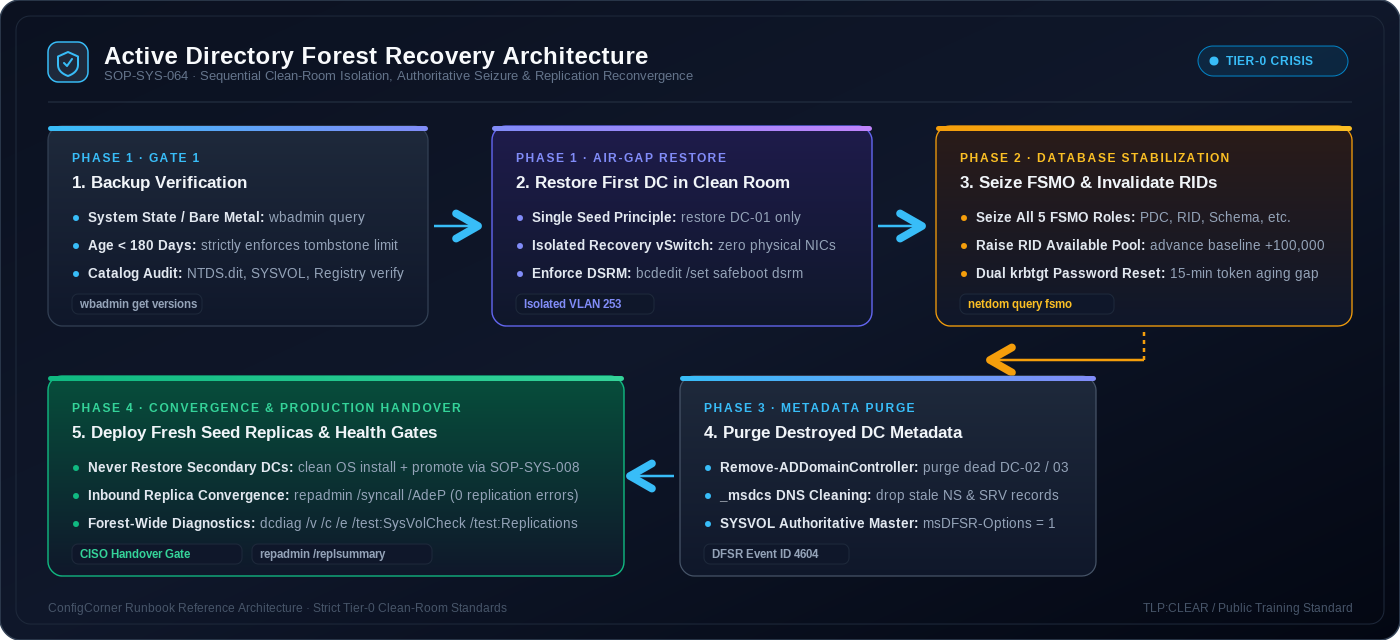
Active Directory Forest Recovery Workflow: Verify backup tombstone integrity, restore the sole seed Domain Controller in network isolation (DSRM), authoritatively seize FSMO roles and increment RID pools, invalidate Kerberos tickets via dual krbtgt rotation, purge stale partner metadata, and rebuild fresh replica nodes from clean media.
Recovery Prerequisites & Backup Selection Matrix
| Parameter | Operational Threshold | Recovery Rationale |
|---|---|---|
| Backup Age Limit | < 180 days (Tombstone Lifetime) | Backups older than 180 days cannot be restored without severe object corruption. |
| Seed DC Selection | Previous Holder of PDC Emulator role | Minimizes FSMO discrepancies and maintains the most accurate time metadata. |
| Backup Type | Verified System State or Bare Metal | Must contain NTDS.dit, SYSVOL, Registry, Boot files, and Active Directory Integrated DNS. |
| Recovery Network | Private Isolated VLAN (192.168.253.0/24) | Disconnected from corporate WAN, core routing, and external Internet. |
Execution: Phase 1 — Backup Verification & System State Restore
Verify System State Backup Integrity and Tombstone Age
Catalog AuditInspect the candidate backup archive using wbadmin from an administrative recovery console to ensure catalog integrity and verify age is within tombstone limits.
# Query available System State backups on the recovery storage volume (E:)wbadmin get versions -backupTarget:E:
# Inspect target version details (e.g., Version: 10/18/2026-02:00)wbadmin get items -version:10/18/2026-02:00 -backupTarget:E:
❯ Illustrative Output (Results Vary)
Confirm backup version is younger than the forest Tombstone Lifetime (180 days) and reports:"Can recover: System State"Boot Recovery VM into Directory Services Restore Mode
DSRM BootProvision a clean VM on the isolated recovery vSwitch, attach the backup volume, and configure boot parameters to enforce Directory Services Restore Mode (DSRM).
# Set Windows boot manager to start in Directory Services Repair modebcdedit /set safeboot dsrm
# Alternatively, from elevated command prompt in Windows PE Recovery:bcdedit /store C:\Boot\BCD /set {default} safeboot dsrm
❯ Illustrative Output (Results Vary)
Restart machine and verify console displays:"Safe Mode: Directory Services Repair" on login screen.Execute Authoritative System State Restore
System State RecoveryExecute the authoritative System State restoration command via wbadmin to unpack the Active Directory database onto the seed DC.
# Execute System State restore from backup storagewbadmin start systemstaterecovery -version:10/18/2026-02:00 -backupTarget:E: -quiet
# Reboot the server once restoration completesRestart-Computer -Force
❯ Illustrative Output (Results Vary)
Confirm event log Microsoft-Windows-Backup registers Event ID 4:"The backup operation has completed successfully."Execution: Phase 2 — Database Stabilization & FSMO Seizure
Seize All 5 FSMO Roles Authoritatively
FSMO SeizureBecause this restored Domain Controller is now the sole surviving DC in the entire forest, it must seize all 5 Flexible Single Master Operation (FSMO) roles immediately.
# Seize all 5 FSMO roles to the local DC (DC-01)$TargetDC = (Get-ADDomainController).Name
Move-ADDirectoryServerOperationMasterRole -Identity $TargetDC `    -OperationMasterRole SchemaMaster, DomainNamingMaster, PDCEmulator, RIDMaster, InfrastructureMaster `    -Force -Confirm:$false
# Verification querynetdom query fsmo
❯ Illustrative Output (Results Vary)
Schema master DC-01.corp.internalDomain naming master DC-01.corp.internalPDC DC-01.corp.internalRID pool manager DC-01.corp.internalInfrastructure master DC-01.corp.internalThe command completed successfully.Invalidate Existing RID Pool & Prevent Duplicate SIDs
RID InvalidationTo prevent the restored Domain Controller from re-issuing SIDs that may have been allocated prior to the disaster, invalidate the RID pool and raise the RID pool baseline by 100,000.
# Query current RID pool baseline$DSE = [ADSI]"LDAP://RootDSE"$Domain = [ADSI]"LDAP://$($DSE.defaultNamingContext)"$RIDManager = [ADSI]"LDAP://CN=RID Manager$,CN=System,$($DSE.defaultNamingContext)"
Write-Host "Current RID allocation pool: $($RIDManager.rIDAvailablePool)"
# Raise RID Available Pool using ntdsutil# Force immediate new RID allocation by restarting NTDSRestart-Service NTDS -Force
❯ Illustrative Output (Results Vary)
Check System event log for Event ID 16648:"A new RID pool was successfully allocated."Dual-Rotation of Kerberos Ticket-Granting Service (krbtgt)
Golden Ticket KillInvalidate all golden tickets and forged Kerberos credentials across the forest by resetting the krbtgt password twice with a 15-minute wait.
Import-Module ActiveDirectory
# 1. First krbtgt rotation$Pass1 = (-join ((65..90) + (97..122) + (48..57) + 33..38 | Get-Random -Count 32 | ForEach-Object {[char]$_}))Set-ADAccountPassword krbtgt -NewPassword (ConvertTo-SecureString -AsPlainText $Pass1 -Force) -Reset
Write-Host "[-] First krbtgt reset complete. Pausing 15 minutes for ticket invalidation..." -ForegroundColor CyanStart-Sleep -Seconds 900
# 2. Second krbtgt rotation$Pass2 = (-join ((65..90) + (97..122) + (48..57) + 33..38 | Get-Random -Count 32 | ForEach-Object {[char]$_}))Set-ADAccountPassword krbtgt -NewPassword (ConvertTo-SecureString -AsPlainText $Pass2 -Force) -ResetWrite-Host "[+] Dual krbtgt rotation complete. All forged tickets invalidated." -ForegroundColor Green
❯ Illustrative Output (Results Vary)
Verify PasswordLastSet timestamp is current:Get-ADUser krbtgt -Properties PasswordLastSet | Select-Object Name, PasswordLastSetExecution: Phase 3 — Metadata Cleanup & Replica Rebuild
Perform Metadata Cleanup of Destroyed Domain Controllers
Metadata PurgePurge all offline and destroyed Domain Controllers from Active Directory metadata so the directory reflects this DC as the sole operational node.
# Get list of all registered DCs excluding self$RestoredDC = (Get-ADDomainController).Name$DeadDCs = Get-ADDomainController -Filter * | Where-Object { $_.Name -ne $RestoredDC }
foreach ($DC in $DeadDCs) {    Write-Host "[-] Purging destroyed Domain Controller metadata: $($DC.Name)..." -ForegroundColor Yellow    Remove-ADDomainController -Identity $DC.Name -Confirm:$false}
# Delete dead DC records from DNS _msdcs zone$DnsServer = "127.0.0.1"$Zone = "_msdcs.corp.internal"Get-DnsServerResourceRecord -ZoneName $Zone -ComputerName $DnsServer |    Where-Object { $DeadDCs.HostName -contains $_.RecordData.NameServer } |    ForEach-Object {        Remove-DnsServerResourceRecord -ZoneName $Zone -Name $_.HostName -RRType $_.RecordType -Confirm:$false    }
❯ Illustrative Output (Results Vary)
Run: Get-ADDomainController -Filter *Verify only the single restored DC is returned.Perform Authoritative Restoration of SYSVOL DFSR
Authoritative SYSVOLForce the single restored Domain Controller to act as the authoritative primary publisher for SYSVOL content.
# 1. Stop DFS Replication ServiceStop-Service DFSR
# 2. Set authoritative sync flag in ADSI:# Set msDFSR-Options = 1 on the local SYSVOL subscription object$DN = "CN=SYSVOL Subscription,CN=Domain System Volume,CN=DFSR-LocalSettings,CN=$RestoredDC,OU=Domain Controllers,DC=corp,DC=internal"Set-ADObject -Identity $DN -Replace @{"msDFSR-Options"=1}
# 3. Start DFSRStart-Service DFSR
# 4. Verify publicationGet-WinEvent -LogName "DFS Replication" -MaxEvents 5 | Where-Object { $_.Id -in 4602, 4604 }
❯ Illustrative Output (Results Vary)
Event ID 4602 / 4604 appears in DFS Replication log:"The DFS Replication service initialized the SYSVOL replica."SYSVOL and NETLOGON shares are active (net share).Rebuild Replica Domain Controllers from Clean OS Images
Replica BuildDeploy fresh replica Domain Controllers (DC-02, DC-03) using clean Windows Server installations per SOP-SYS-008.
# On fresh VM (DC-02):# Install AD DS and DNS rolesInstall-WindowsFeature -Name AD-Domain-Services, DNS -IncludeManagementTools
# Promote as replica partner pointing to DC-01Install-ADDSDomainController `    -DomainName "corp.internal" `    -ReplicationSourceDC "DC-01.corp.internal" `    -InstallDns:$true `    -SafeModeAdministratorPassword (Read-Host -Prompt "Enter DSRM Password" -AsSecureString) `    -Force:$true
❯ Illustrative Output (Results Vary)
Run: repadmin /syncall /AdePVerify full replication convergence with 0 errors across all naming contexts.Execution: Phase 4 — Reconnection Gate & Post-Recovery Audit
Execute Forest-Wide DCDIAG Diagnostics
Validation GateBefore moving the forest back to production VLANs, execute comprehensive validation testing across all naming contexts and core directory services.
# Run full suite of DCDIAG health testsdcdiag /v /c /e /test:Replications /test:NCSecDesc /test:NetLogons /test:SysVolCheck❯ Illustrative Output (Results Vary)
All tested components report:"passed test Replications""passed test NetLogons""passed test SysVolCheck"0 fatal errors detected.Rollback & Audit Sign-Off
Abort Restore and Pivot to Earlier Baseline Snapshot
Rollback PivotIf the restored database contains severe logical corruption or crashes upon initial boot with database errors, abort and pivot to an alternative earlier backup.
# 1. Shut down corrupted recovery VMStop-VM "DC-01-RECOVERY" -Kill -Confirm:$false
# 2. Format recovery OS volume# 3. Select alternative backup snapshot from repository (e.g. 7 days prior)$AltVersion = "10/11/2026-02:00"wbadmin start systemstaterecovery -version:$AltVersion -backupTarget:E: -quiet
Operational Audit & Disaster Recovery Sign-off
| Recovery Milestone | Mandatory Standard | Approver | Sign-Off |
|---|---|---|---|
| Clean Room Isolation | Zero network connectivity to contaminated systems | Network Engineering | Approved |
| FSMO Role Seizure | All 5 roles owned by single restored DC | Lead Systems Administrator | Approved |
| RID Pool Raised | RID available pool incremented by 100,000 | Systems Administration Team | Approved |
| Dual krbtgt Reset | Password rotated twice with 15-minute gap | Security Operations | Approved |
| Metadata Purged | All destroyed DCs cleaned from AD & DNS | Systems Administration Team | Approved |
| SYSVOL Publication | Event ID 4602/4604 logged; shares active | Systems Administration Team | Approved |
| Forest Authorization | Formal CISO sign-off prior to WAN reconnection | CISO | Approved |
Your feedback keeps these production procedures accurate and battle-tested.